Atomcraft Power Grid: Turbines, Solar Panels, and Energy Budgeting
Plan Atomcraft power grids with turbine and solar generation, electrode and Ruby Laser loads, heating and cooling costs, and the June 2026 ship-system electricity expansions.
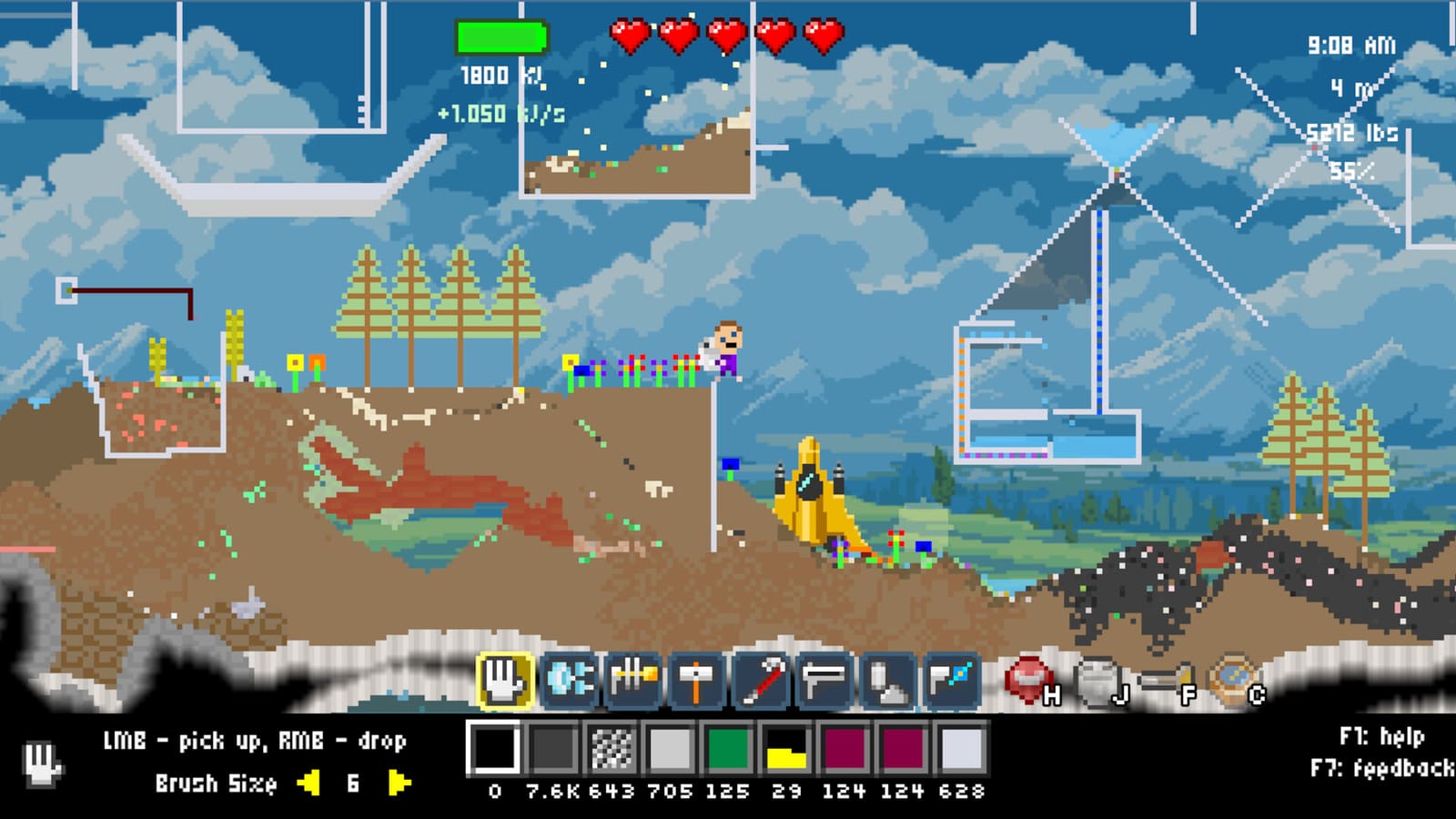
Atomcraft Power Grid
Electricity in Atomcraft is not a cosmetic overlay — it is a factory budget measured per pixel. Every generator, consumer, and mover on your grid adds or subtracts from the same pool. The June 2026 devlog tied power grids to ship systems and world-map logistics, so mid-game bases need a deliberate energy plan before electrolysis bays, laser cutters, and vertical ore lifts all stall at once.
This page explains generation, consumption, the on-screen electricity indicator, and how to avoid infinite-energy cheese while still running heated turbine loops and daytime solar farms.
How Atomcraft tracks energy
Atomcraft electricity is pixel-based: each power-producing or power-consuming pixel contributes to your grid totals. There is no abstract “power block” hidden off-screen — what you place is what you pay for.
The electricity indicator in the UI reports two numbers players should watch constantly:
- Rate — how fast energy is flowing right now (generation minus draw).
- Total — stored or accumulated energy in the grid (context depends on your layout).
If rate turns negative and stays there, something will brown out: electrodes stop splitting, Ruby Lasers idle, upward pumps freeze, and cooling lanes fall behind forge heat. Build with headroom, not zero-margin math.
Turbine pixels — kinetic generation
Turbine pixels convert moving matter into electricity. Drop ore, water, charcoal chips, or any solid/liquid stream through a turbine column — materials falling or rising through the pixel spin the generator. More mass flow generally means more output, but the layout must stay continuous; stalled belts waste spin.
A mid-2026 balance pass increased turbine power output, making closed-loop water towers viable again after earlier nerfs. Community builds often pair turbines with:
- Heated water loops from heat system pixels (see consumption below).
- Timed doors from wiring and logic so feed pulses match turbine capacity.
- Storage buffers before heavy consumers like electrolysis.
Turbines reward vertical factories. Sideways spaghetti feeds work, but gravity-assisted drops are the classic Atomcraft pattern.
Solar Panel — daytime, aboveground power
The Solar Panel generates during daytime only. It must sit aboveground with open space above the panel — cave ceilings, stacked blocks, or enclosed roofs block output. Night leaves solar dark; plan charcoal burn or turbine fallback for 24/7 lanes.
Solar received two notable buffs in the 2026 power-grid rollout:
- Base output doubled in an earlier patch.
- Output increased further alongside Turbine tuning, so hybrid solar + turbine bases became the recommended mid-game default.
Solar panels now sit in the same unlock family as laser pixels (see patch notes). Surface camps near the crashed ship are ideal first farms before you bury sensitive logic under limestone.
Power consumers you will actually feel
Electrode pixels and electrolysis
Electrode pixels drive electrolysis in adjacent cells. They require steady energy; starving them mid-run leaves half-split salts and contaminated lanes. Read the full workflow on how to use electrolysis before wiring a multi-cell bay.
Budget one turbine column or several solar panels per electrode line, and isolate electrolysis rooms from forge heat so cooling from cooling and noble gases does not fight your grid.
Ruby Laser
The Ruby Laser cuts and processes materials with a focused beam and draws significant power while active. Place it on a trunk that can spike load without browning out neighbors.
Rotate the laser with R and Shift-R so beams align with conveyors and chutes — mis-aimed lasers waste energy cutting empty air.
Heating and cooling pixels
Heating pixels and cooling pixels both consume energy. Heating costs much more than cooling — an intentional balance so infinite turbine loops cannot run on free hot water forever. If you heat a closed water tower to keep turbines spinning, the heating bill must be paid by real generation (solar daytime, fuel burn, or excess turbine elsewhere).
Cross-link heat system for loop design and cooling and noble gases for quench lanes that must stay cold while the grid is loaded.
Upward pumps and upward conveyors
Pumps pushing upward and conveyors moving upward consume energy. Sideways and downward movement does not carry that surcharge — another reason Atomcraft vertical bases feel “expensive” compared to flat sprawls.
When planning Buried City ore lifts, count every upward segment in your rate budget before promising 24/7 automation.
Avoid infinite-energy cheese
The developers explicitly tuned 2026 power grids to block infinite-energy exploits. Loops that generated net power from frictionless water wheels, uncosted heating, or solar stacked under fake “open sky” no longer work as free batteries.
Play as intended:
- Burn fuel (charcoal, coal) where heat is required.
- Use solar on genuine surface pads with daylight and clear sky.
- Size turbines to real mass throughput, not one-pixel trickle feeds.
- Accept heating costs on turbine loops — the drain is the balance lever.
If a layout looks like a perpetual motion machine, it probably flatlines after the next patch. See patch notes for the June 2026 power-grid and ship-system changelog.
Ship systems, world map, and June 2026 expansions
Power grids no longer live only in surface shacks. June 2026 expansions linked electricity to ship systems restored on the crashed vessel and to friendly spaceships you repair across the world.
From the world map, you can teleport to repaired friendly spaceships — treat them as remote bases with their own generation and draw. Details on zoom, search, and teleport UI live on the world map guide. Power planning now spans multiple sites: a solar farm at camp, turbines in a limestone shaft, and ship systems drawing while you are away.
Restored ship elements still feed Research Points; power-hungry ship systems reward finishing restoration before you scale electrolysis or programmable pixels sorters.
Watch: power and automation together
Mid-build, compare turbine placement, solar exposure, and consumer spikes with a working reference.
Sample power-grid layout
- Surface solar row — daytime baseline above camp; no overhangs.
- Turbine shaft — ore/water drop through two turbines into storage.
- Heated loop branch — optional; budget heating cost explicitly.
- Electrolysis wing — electrodes on dedicated trunk with rate headroom.
- Ruby Laser bay — rotated with R / Shift-R toward product chute.
- Upward lift — count pump and conveyor up-cost in the indicator.
- Logic mezzanine — wiring and logic on cool side, not on power trunk.
Related builds and guides
- Wiring and logic — timed feeds for turbines and safe doors.
- Heat system — heating loops and their energy cost.
- Cooling and noble gases — cooling draw alongside electrolysis.
- Programmable pixels — sorters and sensors on the same grid.
- Patch notes — June 2026 power-grid balance history.
- World map — teleport between powered ship sites.
- How to use electrolysis — electrode placement and chemistry.
Atomcraft power is a design puzzle, not a checkbox. Read the electricity indicator, pay for upward motion, and generate honestly. Factories that respect the grid keep running when the sun sets and the lasers turn on.
Frequently Asked Questions
Quick answers tied to this page.
How does Atomcraft measure electricity?
Energy is tracked per pixel — each generator and consumer adds to grid rate (flow now) and total (stored context). Watch both numbers before scaling electrolysis or lasers.
Why is my Solar Panel not generating?
Solar works only in daytime, aboveground, with open space above the panel. Cave roofs, stacked blocks, or night will zero its output.
Do upward conveyors and pumps cost power?
Yes. Upward pumps and upward conveyors consume energy; sideways and downward movement does not. Budget vertical lifts explicitly.
Why does heating cost more than cooling?
Heating pixels draw much more power than cooling pixels — a deliberate balance so heated water turbine loops cannot become infinite free energy.
How do ship systems tie into the power grid?
June 2026 expansions linked electricity to restored ship systems and friendly spaceships. Use the world map to teleport between repaired ships, each with its own generation and load.